Creative Commons License
Except where otherwise noted, original content on this blog curated and authored by Magdalena Galloway and the LRNTECH3600 instructional team at the University of Northern Iowa is licensed under a Creative Commons Attribution-NonCommercial-ShareAlike 4.0 International License.

Note: External articles, videos, podcasts, and third-party media linked or embedded within posts remain the property of their respective copyright holders.

Information Literacy

Do you want to know...

Remember, all I'm offering is the truth... nothing more.

The Matrix could be an excellent allegory for finding truth in the chaos of disinformation. It could be about breaking an information bubble we may live in and choosing the right path. Unfortunately, we cannot load the skills like Neo could. Fortunately, our information and fake news Matrix is not as grim as the one in the movie...or is it?
“You take the blue pill, the story ends, you wake up in your bed and believe whatever you want to believe.  You take the red pill, you stay in Wonderland, and I show you how deep the rabbit hole goes.”  ~ Morpheus, The Matrix 
I hope you choose the knowledge, aka the red pill. So, here it goes: 

Information literacy is more than possessing information. Information literacy is the ability "to recognize when information is needed and have the ability to locate, evaluate and use effectively the needed information." (ACRL, 2000)

Developing information literacy skills requires a combination of tools, educational resources, and critical thinking practice.


Play and save for later: 
To help students see how easily fake news can be created, try a media literacy activity using online generators that mimic real headlines and articles. Pair this with a discussion on the ethical use of media and information to help students think critically about credibility, intent, and impact.
What practical steps can you and your students take to critically evaluate information found on the Internet? How can we protect them and ourselves from fake news, scams, and phishing?

  • Read about those Facebook 'Like' Scam Posts - what are those and how to spot them

  • Watch the short video from Commonsensemedia.org about 5 ways to spot fake news. Look around the Common Sense website. Notice organizational tabs for Parents, Educators, and Advocates. Add useful links to your bookmarks or pins collection.

  • Read Stephen Downe's post about Principles for Evaluating Website

  • What is a Filter Bubble? How does it isolate you? - watch this short video (2.37min ) explaining just that!

  • Browse and bookmark (pin?) for later - Fake news and misinformation advice hub from internetmatters.org where you can learn about fake news, how to spot it, and how to empower children to recognize what fake news is and how to stop the spread of it

  •  Can you spot when you’re being phished? Take this quiz to find our phishingquiz.withgoogle.com/ 
How to check the credibility of controversial information?
  • Browse, test, and bookmark: Pick a controverisal topic and test how it is presented in the following fact checking websites:
    • snopes.com - a reference source for urban legends, folklore, myths, rumors, and misinformation.  
    • Fact Check Tools -from Google labs 
    • AllSides.com: Balanced News from the Left, Center, and Right
      Look for resources about media bias, and check the incredibly well-developed 
      resources for schools!
    • poynter.org - The Poynter Institute is a non-profit journalism school and research organization dedicated to strengthening democracy by improving the relevance, ethics, and value of journalism through training, fact-checking initiatives like PolitiFact, and media literacy programs. 
    • factcheck.org -  a nonpartisan, nonprofit website operated by the Annenberg Public Policy Center that monitors the factual accuracy of major U.S. political figures and advocacy group
    • opensecrets.org - follows money in Politics 
    • hoax-slayer.com - The goal is to provide fact-checked information about internet hoaxes and to educate users about online security issues like scams and spam. Brett M. Christensen started Hoax-Slayer in Australia after being tricked by a fake virus warning. He runs the site with help from his sons.

Learning (and teaching) today is much different than it used to be. So, it is logical to look for new learning theories!

Connectivism is a relatively new but mighty theoretical framework for understanding learning in a digital age.  
  • It is a theory that argues that learning is not just about memorizing facts but about how you connect those facts together. It's like building a network of information in your mind, where each piece of knowledge is a node, and the connections between them are what help you understand and navigate the world. So, instead of just storing information, you're actively creating a web of understanding. It will be important to keep in mind when building your Personal Learning Network (PLN)
  • Connectivism acknowledges that learning is a social process and individuals bring unique perspectives and experiences to the learning process. Interacting with diverse viewpoints enriches understanding and fosters creativity and innovation.
Watch this short video explaining the theory of Connectivism (3 min). This will be further discussed in the lecture. 


What strategies could students adopt to make decisions or solve an information problem?  
  • Analyze the Big6 and Super3  process models of how people should solve information strategies. S per 3 is a simplified model for the youngest students. 
    • Connect it to the ISTE Student Standard #5: Computational Thinker: Students develop and employ strategies for understanding and solving problems that leverage technological methods' power to develop and test solutions.
      • 5b Students collect data or identify relevant data sets, use digital tools to analyze them, and represent data in various ways to facilitate problem-solving and decision-making.
      • 5 c Students break problems into component parts, extract key information, and develop descriptive models to understand complex systems or facilitate problem-solving. 
Consider pinning or bookmarking the resources for future use (build that PLN!

--
Additional resources (not required; to use, bookmark, or pin for later):

Helping students understand the biases in generative AI - materials on this page are intended to help instructors and students analyze and discuss the biases and ethics of generative artificial intelligence.

Strawberry Problem -  How Overconfidence in AI Responses can perpetuate misinformation and create a feedback loop, and on how GenAI desire to satisfy the user may not be the best thing.

Chat GPT for media literacy -an interesting article about why using AI could be a great media literacy instruction tool.

Information Literacy Standards for Student Learning (pdf) provides a conceptual framework and broad guidelines for describing the information-literate student.

Ground.news  - is a Canadian news aggregator that counters media bias by presenting coverage of a story from sources across the political spectrum, allowing readers to compare viewpoints and see their own media blind spots

Siemens and Downes theory of Connectivism


sourcewatch.org - a collaborative resource for  documented information about the corporations, industries, and people trying to influence public policy and public opinion

domaintools.com - a collection of domain name ownership records in the world (also look easywhois.com)


ISTE Standards for Students connection:

Standard # 3: Knowledge Constructor: Students critically curate a variety of resources using digital tools to construct knowledge, produce creative artifacts and make meaningful learning experiences for themselves and others.
  • 3a. S udents plan and employ effective research strategies to locate information and other resources for their intellectual or creative pursuits.
  • 3b. S udents evaluate the accuracy, perspective, credibility, and relevance of information, media, data or other resources.
Standard #2 Digital Citizen: Students recognize the rights, responsibilities and opportunities of living, learning and working in an interconnected digital world, and they act and model in ways that are safe, legal and ethical

Standards #5: Computational Thinker: Students develop and employ strategies for understanding and solving problems in ways that leverage the power of technological methods to develop and test solutions.
  • 5b Students collect data or identify relevant data sets, use digital tools to analyze them, and represent data in various ways to facilitate problem-solving and decision-making.
  • 5 c Students break problems into component parts, extract key information, and develop descriptive models to understand complex systems or facilitate problem-solving. 

ISTE Standards for Educators connection:

Standard #2: Leader: Educators seek out opportunities for leadership to support student empowerment and success and to improve teaching and learning
  • 2c. Educator model for colleagues the identification, exploration, evaluation, curation, and adoption of new digital resources and tools for learning.
EdTech fastest growing minor - fake yahoo news
Standard #3: Citizen: Educators inspire students to positively contribute to and responsibly participate in the digital world.
  • 3b. E ucators establish a learning culture that promotes curiosity and critical examination of online resources and fosters digital literacy and media fluency.
  • 3 c mentor students in safe, legal and ethical practices with digital tools and the protection of intellectual rights and property.
--
Activities during the lab (we will work on them together)


Quote from The Matrix movie: There is a difference between knowing the path and walking the path


Using Stephen Downe's Principles for Evaluating Websites, lecture, and resources above, analyze the resources below.

  • Can you find an argument to support or discredit the legitimacy of your resource? It is not enough to use "gut feeling" or common knowledge.
  • How can you prove it? 
  • Can you see the purpose of the resource? 
  • Could you use it in your classroom?

Exhibit A: (elementary):
http://zapatopi.net/treeoctopus/

Exhibit B:
https://mousetrapnews.com/breaking-marvel-theme-park-coming-to-disney-world/

Exhibit C:
https://insttech.uni.edu/3600/images/infliteracy-vaccinate.jpg

Exhibit D:
https://insttech.uni.edu/3600/documents/mail_SlowDance.pdf


Assesment


Classroom with diversed children engaged in multiple ways (dancing, painting, working on laptops, trying on traditionla hats and reading in a bean bags
Assessment does not have to be indentical to all (AI Gemni prompted by Magda)

This Week’s Focus: Assessment with Equity in Mind

We’re exploring types, purposes, and design principles of assessment, with a special emphasis on fairness and student diversity. You’ll read, watch, and reflect on how assessments can be designed to support all learners.
These resources will support you in reaching  the InTASC standards UNI Educator Essentials Category 5: Effective Pedagogy:
  • 1(g) Learner Development: The teacher understands the role of language and culture in learning and knows how to modify instruction to make language comprehensible and instruction relevant, accessible, and challenging.
  • 6(k) Assessment: The teacher understands the range of types and multiple purposes of assessments and how to design, adapt, and select appropriate assessments to address specific learning goals and individual differences and to minimize sources of bias
  • 8(l) Instructional Strategies: The teacher knows when and how to use appropriate strategies to differentiate instruction and engage all learners in complex thinking and meaningful tasks.

Readings

1. Formative Assessment – Iowa Department of Education
This section from the Iowa Department of Education explains how formative assessment supports learning during instruction. It emphasizes using feedback, student involvement, and goal-setting to guide teaching decisions and improve student outcomes.
Link: https://educate.iowa.gov/pk-12/standards/assessment/formative

2. Universal Design of Assessments – National Center on Educational Outcomes (NCEO)
This resource outlines how assessments can be designed to be accessible and inclusive for all students, including those with disabilities and English learners.
Pay attention to:

  • The 7 principles of Universal Design for Assessment
  • How these principles align with Universal Design for Learning (UDL)
  • The importance of accessibility for valid and fair assessment results
    Link: https://nceo.info/Assessments/universal_design

3.  Differentiation  - means tailoring assessment to meet individual needs, and to best gage student's understanding onf the learning. 

Explore 

How differentiated assessment supports inclusive, student-centered learning in the NSW K–10 curriculum. https://educationstandards.nsw.edu.au/wps/portal/nesa/k-10/understanding-the-curriculum/assessment/differentiated-assessment

How to Differentiate Instruction from Reading Rockets:  https://www.readingrockets.org/topics/differentiated-instruction/articles/what-differentiated-instruction

Explore the concepts of MTSS (A multi-tiered system of supports) - https://mtss4success.org/essential-components

Watchings

Understanding Assessments – Kathleen Jasper, Ed.D

Length: 7.32 minutes
This video introduces the main types of assessments—formative, summative, diagnostic, and benchmark, and explains how each is used in classrooms and on teacher certification exams. Kathleen Jasper highlights the attributes and purposes of each type, helping educators understand when and why to use them.

Video link: https://youtu.be/9qMNOCRc7HE?si=kCky3cIWqjx4nOAp

About the author: Dr. Kathleen Jasper is an educator and founder of Kathleen Jasper EdD, where she offers study guides and prep resources for exams like the FTCE, Praxis, and FORT. Her video's may come handy in a future. Here is a link to her YOuTube channel: https://www.youtube.com/@KathleenJasperEdD

Here is a video of her explaning what is MTSS. It provides a comprehensive overview to enhance your understanding, particularly ior  new teachers  

Video link: https://www.youtube.com/watch?v=wzMzZbevJH4&t=3s 


This video explains in a simple but effective analogy what is a difference between Unviersal Design for Learning and Differentiated Instruction 


Copyright, Fair Use & Creative Commons


Image source: Wikimedia Commons (this image is in the public domain)
These RWLDs introduce you to fundamental principles of U.S. copyright law, fair use, public domain, and Creative Commons. Understanding these concepts is key to making legal/ethical decisions about incorporating media into your educational projects (and guiding your students to do so in the future).

    List of Terms and Concepts You Should Know:

    Resources

    If you are a reader, familiarize yourself with pages 1—6 of Copyright Basics (PDF) from the US Copyright Office (copyright.gov). This introduction to copyright law outlines the types of works protected and defines ownership, as well as the typical duration of copyright protection.

    If you would rather watch videos to learn, review the 3 videos below:

    Using Copyrighted Works in Our Own Creations: Fair Use, Creative Commons, and Permissions


    Copyright History


    Creative Commons

    This 5-minute video explains why Creative Commons was created:


    Creative Commons licenses make it easy for people to share their works, which are otherwise protected by copyright law. This provides terrific opportunities for teachers and students! It's what you might say is a happy middle ground between All Rights Reserved and the public domain.

    Food for thought:

    You probably heard about ChatGPT and the concerns it raises among schools. We are witnessing the rapid development of chatbots and artificial intelligence that can imitate human conversation and generate essays, poems, and even art.

    I asked ChatGPT two questions:

    Q1: What do you think about students using ChatGPT to complete their assigned essays?

    Here are the chat-generated answers:


    Q2: Is ChatGPT in violation of copyright laws?

    Answer:


    What are your thoughts on using chatbots to complete your homework?

    Other Resources (As FYI, not required)


    To listen:

    To read: 

    To bookmark for later: 

    To watch: 


    Creativity, Copyright, and Fair Use from Common Sense Education


    How to read privacy policies like a lawyer


    Visual Literacy

    an eye ball
    Image: Ray eye  Creative Commons license

    To Read: Color matters! Read about color symbolism in different cultures and explore other parts of this website to learn more about the significance of color in our lives.

    To Watch:  You are in the process of designing your teacher's website.  It should be important for you to make conscious decisions about how you present the content of the pages.  
    What makes the page user-friendly? 
    What are the most common design mistakes made when creating websites?  
    To help you answer that, I created a short video about web design considerations: 


    To Watch: Visual Diagramming, Concept Mapping, Mind Mapping - these phrases apply to visually brainstorming or organizing ideas. This video explains the benefits of it:


    Concept Maps for teaching and learning - it may be a useful tool, especially for older students, to represent knowledge of a topic, make connections between ideas 

    To use in the early elementary classroom (or with your kids): C.A.R.P. junior - Design Principles for kids - ideas for practicing them in an elementary classroom.

    To challenge yourself: 
    Look at these 26 of the most iconic photographs  - How many can you name just by looking at them?

    3 Tips specific to your websites:

    1. The "Squint Test" (Visual Hierarchy)

    Pull up your website’s homepage and squint your eyes until the images and text become a blur.

    The Question: Which 2 or 3 elements still stand out the most? Is it your school logo? A "Class Resources" button? Or is it a random decorative image? If the most important information isn't "popping" through the blur, how can you use size or color to fix it?

    2. The 3-Second "F-Pattern" (Layout)

    Imagine a busy parent/guaridan is looking at your site and only has 3 seconds to find how to email you before they have to run an errand.

    The Question: Looking at your current layout, where is your contact info located? Based on the "F-Pattern" (where readers scan the top and the left side first), is your most vital information in a "high-traffic" area or is it hidden in a "dead zone" at the bottom?

    3. The "Personality" Check (Consistency & Repetition)

    Look at the fonts and colors you’ve chosen for your headings versus your body text.

    The Question: If your website's design were a "teacher outfit," what would it be saying? (e.g., Is it a professional suit, a creative art smock, or a messy desk?) Does the repetition of your colors and fonts across different pages make the site feel like a cohesive classroom, or does every page feel like a different room?

    ---------

    Additional optional resources:

    ISTE Standards for Educators:
    2.5c Educators explore and apply instructional design principles to create innovative digital learning environments that engage and support learning.
    2.6d. Educators model and nurture creativity and creative expression to communicate ideas, knowledge or connections.

    ISTE Standards for Students :
    1.1b Students build networks and customize their learning environments in ways that support the learning process.
    1.6c Students communicate complex ideas clearly and effectively by creating or using a variety of digital objects such as visualizations, models, or simulations.


    AI and Learning

    Artificial Intelligence (AI) is a relatively new presence in K-12 education, gaining widespread attention in early 2023 with the release of free, public-facing Generative AI tools like ChatGPT.

    As a digital-age educator, it’s important to understand two distinct but equally important aspects of AI in education:

    • Using Generative AI to support your professional practice: AI can serve as your pedagogical copilot, instructional support system, or digital assistant, helping with lesson planning, generating feedback, streamlining communication, and handling administrative tasks. These tools are designed to enhance your workflow, save time, and support more personalized learning experiences. 

    • Teaching students about AI: means helping them understand how it works, processes data, and generates information. This involves building information literacy to critically evaluate AI content, learning to use AI as a tool to support and enhance human thinking, never to replace it, and exploring its ethical, economic, and cultural impacts on society.

    Since we’re in a lifelong learning profession, it’s on us to stay informed and adapt to emerging trends. The changes are already underway, and we’re living in exciting times. So, let’s dive in!


    cute machine learning AI from code.org
    Machine learning from code.org

    Watch and Do: Teaching Students About AI
    (REQUIRED ASSIGNMENT – Assignment #3)
    Submit your Certificate of Completion and Reflection as outlined in the assignment description on eLearning.

    In this activity, you’ll complete linked short, eight-step unit from Code.org designed to help you, and your students, explore key concepts in Artificial Intelligence. The unit covers:

    • Types of machine learning
    • Training data and pattern recognition
    • Classification models
    • Ethical concerns like bias in AI
    • How AI can be used to address global challenges

    This assignment is not just about learning how AI works! It’s about preparing to teach students how to think critically about AI’s role in society, its limitations, and its potential.

    Extra: Play AI Quest, a free, game-based learning program developed by Google Research and the Stanford Accelerator for Learning to teach AI literacy to students aged 11–14. It places students in the role of researchers solving real-world challenges (like flood forecasting and health diagnostics using simulated data)

    To read: 15 Times to use AI, and 5 Not to.
    Ethan Mollick argues that "AI is often most useful where we're already expert"- Why? 

    Read his notes on the Practical Wisdom of AI Use-  As future educators, it’s essential to understand how to use AI and guide your students to use it responsibly. This article shows when AI can support learning and when judgment matters most:  https://www.oneusefulthing.org/p/15-times-to-use-ai-and-5-not-to

    A Human-Centered Approach to AI: Teaching Students to Think Critically About Technology

    A human-centered approach to AI emphasizes that artificial intelligence should serve people - not replace them. It prioritizes human well-being, dignity, and equity in how AI systems are designed, used, and regulated.

    When teaching students about AI, it’s important to help them explore these values and understand the broader societal context. UNESCO’s 2021 Recommendation on the Ethics of AI offers a powerful framework for this kind of learning. It encourages educators and students to consider:

    • How AI can amplify human capabilities through collaboration, not substitution
    • The importance of human rights in guiding AI development and use
    • The need to protect human dignity and cultural diversity
    • The role of regulation and ethical oversight in ensuring AI supports inclusive, just, and sustainable futures

    By engaging students in these conversations, we prepare them not just to use AI, but to shape its future responsibly.

    Watch: (2 min.33s) Machine Learning and Human Bias - How it can perpetuate human bias, why it is important to know, how Google approaches this problem, and what you can do about it. 


    In our lecture on thinking skills, you learned about Bloom’s taxonomy. You probably understand that the importance and context of reaching each level of LOTS and HOTS shifts over time, influenced by technology and easier access to basic information. As a result, the balance between lower- and higher-order thinking changes too. With basic facts now just a click away, the emphasis moves toward critical thinking, especially analysis and evaluation, to help students use technology wisely and avoid being misled by it.

    Read: How AI is changing Bloom Taxonomy - a TEFL teacher shares practical ways AI can support critical thinking at every level of Bloom’s framework. This resource helps you see how AI tools can streamline planning, boost engagement, and make learning more meaningful. 


    The Artificial Intelligence (AI) for K-12 initiative (AI4K12): https://ai4k12.org/ :
    Organize the topics surrounding Artificial Intelligence and organize them into 5 Big Ideas. Each Idea has a progression chart similar to DOK that can help you teach about AI in a different grade level.  


    5 Big Ideas in AI


    To do: Go to this link: https://ai4k12.org/gradeband-progression-charts/ and open a progression chart for each idea. Try to make sense of what kind of AI concepts and topics should be taught in each grade. Would you be able to teach them today?


    To do: Please create a free account on magicschool.ai—we suggest using a private account. We will evaluate it in labs. 

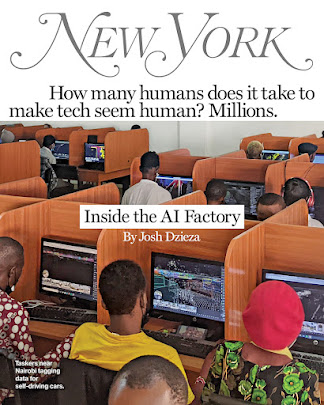
    To read:  Inside the AI Factory. Behind even the most impressive AI system are people. Vast numbers of low-paid people label data to train it and clarify data when it gets confused. As the technology becomes ubiquitous, a large tasker underclass is emerging:


    ----

    Other Resources (not required, but useful) 

    To bookmark and use: Approaches & Guides to Prompt Engineering in LLM like ChatGPT
    P.A.R.T.S. Framework for AI Prompts

    The “Elements of a Good Prompt” PDF highlights tips and aspects for writing prompts effectively.

    To browse: Resources from aiedu.org The AI Education Project. We used some resources from there while working on Digital Citizenship activities. 

    To listen: Pondering AI podcast: How is using artificial intelligence (AI) shaping our human experience? Kimberly Nevala talks with diverse innovators, advocates, and data scientists.

    To read, think, and interact: Is the modern development of "god-like technology" a new fire?  A philosophical question for the insomnia minds: Read and consider posting your response 


    To browse: Secondary Idea for English 12: An Exploration of British Classic and Contemporary Science Fiction Literature Focusing on Artificial Intelligence: 

    To read: Everything You Ever Wanted To Know About Computer Vision.

    To browse and bookmark: Applied Digital Skills with Google.

    UNI resources for AI in Teaching & Learning: https://ai.uni.edu/

    Train a computer to recognize your own images, sounds, & poses with a Google Teachable Machine


    ISTE standards for Educators' connection:
    • Standard 2.2 Leader: Educators seek out opportunities for leadership to support student empowerment and success and to improve teaching and learning.
      • 2.2.c Model Digital Tool Use: Model for colleagues the identification, exploration, evaluation, curation, and adoption of new digital resources and tools for learning.
    • Standard 2.3 Citizen: Educators inspire students to positively contribute to and responsibly participate in the digital world.
      • 2.3.b Evaluate Resources for Credibility - Establish a learning culture that promotes curiosity and critical examination of online resources, and fosters digital literacy and media fluency.
      • 2.3.c Teach Safe, Legal, Ethical Practices - Mentor students in safe, legal and ethical practices with digital tools and the protection of intellectual rights and property.
    • Standard 2.4  Collaborator: Educators dedicate time to collaborate with both colleagues and students to improve practice, discover and share resources and ideas, and solve problems.
      • 2.4.b Learn Alongside Students: Collaborate and co-learn with students to discover and use new digital resources, and diagnose and troubleshoot technology issues.
    • Standard 2.6 Facilitator: Educators facilitate learning with technology to support student achievement of the ISTE Standards for Students.
      • 2.6.d Model and Nurture Creativity: Model and nurture creativity and creative expression to communicate ideas, knowledge or connections.

    UDL & Design Thinking


    Universal Design for Learning (UDL) is an educational framework based on research in learning theory, including cognitive neuroscience. It guides the development of flexible learning environments that accommodate individual learning differences.

    CAST (Center for Applied Special Technology) is a non-profit organization founded in 1984 to improve education for all students. CAST pioneered the development of the UDL framework, drawing on scientific insights into how humans learn. One of their key ideas is that there is no "average" brain — we are all different.

    CAST’s mission is to transform education by creating more equitable and inclusive learning environments. The UDL framework is built on three core principles that help educators design flexible instructional experiences:
    • Multiple means of engagement: Offer different ways to motivate and involve students.
    • Multiple means of representation: Present content in various formats to support understanding.
    • Multiple means of action and expression: Allow students to show what they know in different ways.
    By applying these principles, educators can create learning experiences that offer options and support for all learners.

    Download UDL guidelines. Use them while listening tho the lecture. https://udlguidelines.cast.org/static/udlg3-graphicorganizer-digital-nonumbers-a11y.pdf 

    Watch this 5-minute introductory video about UDL 


    What is Design Thinking?

    Design Thinking is a broad, human-centered approach to problem-solving that emphasizes empathy, creativity, and iteration. It’s used across industries (tech, healthcare, business), not just in education, to design solutions that truly meet people’s needs.

    While UDL (Universal Design for Learning) focuses on flexible learning environments, Design Thinking is broader. It supports inclusive design by centering the voices of diverse users and encouraging collaboration, experimentation, and equity-driven innovation.

    Inclusive Design

    "Inclusive design isn't about disability. It's about creating a design process that is in service of all users.". 

    Inclusive Design is a specific application of Design Thinking that ensures solutions work for people with diverse needs, abilities, and backgrounds.

    This video showcases how the Xbox team at Microsoft uses inclusive design to support Deaf and Hard of Hearing gamers by creating features that reflect diverse needs and preferences. It emphasizes that inclusive design is about serving all users, not just those with disabilities, through empathy-driven innovation and collaboration:
     

    Here you can watch similar videos of Inclusive Design in Action 

    Browse the resources at https://inclusive.microsoft.design/ 
     
    Browse the resources on https://webaim.org  WebAIM (Web Accessibility In Mind), a non-profit service center at Utah State University dedicated to improving web accessibility.

    Systematic Instructional Design and Nurturing Thinking Skills


    To begin with the end in mind means to start with a clear understanding of your destination. It means to know where you're going so that you better understand where you are now and so that the steps you take are always in the right direction.

    This set of Readings, Watchings, Listenings, and Doings (RWLDs) is designed to prepare you for the lecture on "Systematic Instructional
    Design and Nurturing Thinking Skills." It will support you as you plan your Thematic Unit and give you useful benchmarks for designing activities that help children grow into curious thinkers, creative problem-solvers, and not just memorizers of facts.

    This post will focus on 5 terms: 
    • Systematic Instructional Design (SID)
    • Backward Design
    • Observable Verbs
    • Bloom's Taxonomy
    • Depths of Knowledge (DoK)

    What is Systematic Instructional Design (SID)?

    It is a methodical (systematic) approach to planning and creating (designing) educational experiences
    that guide learners toward specific goals. By following a structured process, SID ensures that every element of the lesson (instruction) is organized, clear, and tailored to meet the unique needs of your students. This approach also supports continuous improvement, as ongoing evaluation and feedback help refine and enhance the learning experience.


    Designing Your Instruction ...backward


    Generated with AI
    It's just common sense to begin with the end in mind when you are designing instruction. Begin by defining what you want your students to learn and plan your instruction to that result. This is called Backward Design.

    If you don't know where you are going,
    how will you know when you get there?

    Let’s compare Systematic Instructional Design (SID) to planning a road trip:

    1. Decide the Destination (Backward Design)

      • Just like with a road trip, you start by deciding where you want to go. This is the end goal—where you want your learners to end up. In SID, this means defining clear learning objectives.
      • Backward Design: You think about the destination first, and then plan everything else around it. In teaching, this means figuring out what you want students to know or do by the end, and then working backward to plan the journey.
            2. Understand Your Travelers (Learner analysis)
      • You need to know who’s coming on the trip—how much they already know, their interests, and how they like to travel. This is like understanding your learners, their background knowledge, unique needs, and learning styles.

    3. Map Out the Route (Content Sequencing and Structuring)

      • Now, plan the best way to get to your destination. Do you want to take the scenic route or the fastest highway? In SID, this is organizing your content and activities in a logical sequence and scaffolding them from simple to complex.

    4. Pack the Essentials (Instructional Strategies)

      • Make sure you have everything you need—maps, snacks, gas money. In SID, this is about choosing the right teaching methods, tools, and materials to support learning. 
      • Strategies may include direct instruction, collaborative learning, problem-based learning, and use of multimedia

    5. Plan Checkpoints. (Assessment and Evaluation)

      • Along the way, you’ll check your progress—are you still on track? This is like using formative assessments to see if learners are understanding the material as you go. 
      • Use formative assessments to provide ongoing feedback and summative assessments to evaluate overall learning outcomes

    6. Enjoy the Journey (Implementation)

      • Now you’re on the road, following your plan. This is the actual teaching part, where you deliver the lessons. You’re confident in your journey because you planned it backward from the destination. The trip is designed to ensure you reach your final goal.

    7. Reflect on the Trip (Evaluation)

      • When you reach your destination, reflect on how the trip went. Did everything go as planned? This is like evaluating whether your teaching was effective—did the learners achieve the goals?

    8. Improve for the Next Time

      • Learn from the trip to make your next one even better. In SID, use feedback and results to refine your teaching methods. 
      • Use the data from evaluations to make ongoing improvements to the instructional design process.
      • Ensure that the instruction remains relevant and effective as learner needs and technology evolve.
    Makes a lot of sense, doesn't it?


    Measure Success through Observable Verbs

    Observable verbs are action words used to describe specific behaviors or actions that can be seen or measured (assessed!).

    Bookmark:  link to observable verbs, also discussed in the lecture: https://www.teachthought.com/critical-thinking-posts/blooms-taxonomy-verbs/ You may use it as a reference in a thematic unit assignment

    Observable verbs help ensure that learning goals are specific, measurable, and focused on tangible outcomes. Example, 

    If you want to check if your students understand the water cycle, you would use observable verbs to create assessments that clearly show whether they grasp the concept. Instead of asking if they "understand" the water cycle, you would ask them to perform specific tasks that demonstrate their understanding: 

    • Identify (or label) the different stages of the water cycle in a diagram
    • Describe what happens during the evaporation stage
    • Create a simple model of the water cycle using household items and demonstrate how water moves through the cycle
    If you want to check if your students have learned the multiplication table, you would use observable verbs to create assessments that reveal their proficiency. 
    • Fill in the missing numbers in this multiplication table for 1 through 12
    • Solve the following problems: 6 × 9, 4 × 7, and 8 × 5
    • If you buy 3 packs of pencils and each pack contains 12 pencils, calculate how many pencils you have in total.

    Using observable verbs helps ensure that learning objectives and assessments are clear and focused on what students can do, making it easier to observe and measure their progress and success.

    But what kind of thinking are we asking students to demonstrate?

    How can we help our children grow into curious thinkers, creative problem-solvers, and not just memorizers of facts? 
    Thinking can be simple—like remembering a fact—or more complex, like solving a problem or creating something new. As educators, we help students grow across this full range.
    • Lower-Order Thinking (LOTS) includes recalling facts and basic understanding.
    • Higher-Order Thinking (HOTS) involves applying knowledge, analyzing ideas, evaluating outcomes, and creating new solutions.
    To support this growth, we use tools like Bloom’s Taxonomy.  Think of it as building blocks for the mind:
    • It starts with remembering and understanding.
    • Then moves to applying and analyzing.
    • And finally reaches evaluating and creating.
    Bloom’s helps us design lessons that challenge students to think more deeply. It also guides us in writing clear learning goals using action words that show what students will do.
    To watch: In this video, you can see a quick recap about Bloom's Taxonomy and also how it applies in a digital world 


    Depths of Knowledge (DoK)

    We also consider Depth of Knowledge (DoK) to assess how deeply students understand and apply their learning. DoK helps us design meaningful assessments that go beyond surface-level recall.

    While Bloom's Taxonomy is commonly used to categorize and evaluate the thinking processes students use to understand and apply knowledge, it isn't specifically designed to assess the complexity of students' knowledge or the assessments teachers use.

    In contrast, Depth of Knowledge (DoK) is a framework created to evaluate the depth and complexity of tasks, tests, and projects. It helps educators:
    • Design assessments that challenge students appropriately
    • Measure students' understanding and skills more accurately
    • Align tasks with learning goals and standards

    DoK involves 4 Levels:
    Level 1: Recall and Reproduction - involves basic recall of facts or information.
    Level 2: Basic Skills and Concepts - requires more than simple recall and includes applying skills or concepts.
    Level 3: Strategic Thinking - involves reasoning, planning, and using evidence to solve problems.
    Level 4: Extended Thinking - requires complex and abstract thinking, often over an extended period.

    This week, you’ll practice writing objectives that challenge students at all levels of thinking. Remember: the verb is the key to clarity and success.

    --

    Extra Resources (not Required)


    What is Bloom’s Taxonomy, and how can learning and development professionals use it in real-world training programs