Note: External articles, videos, podcasts, and third-party media linked or embedded within posts remain the property of their respective copyright holders.
To Read: Color matters! Read about color symbolism in different cultures and explore other parts of this website to learn more about the significance of color in our lives.
To Watch: You are in the process of designing your teacher's website. It should be important for you to make conscious decisions about how you present the content of the pages.
What makes the page user-friendly?
What are the most common design mistakes made when creating websites?
To help you answer that, I created a short video about web design considerations:
To Watch: Visual Diagramming, Concept Mapping, Mind Mapping - these phrases apply to visually brainstorming or organizing ideas. This video explains the benefits of it:
Concept Maps for teaching and learning - it may be a useful tool, especially for older students, to represent knowledge of a topic, make connections between ideas
To use in the early elementary classroom (or with your kids):C.A.R.P. junior - Design Principles for kids - ideas for practicing them in an elementary classroom.
Pull up your website’s homepage and squint your eyes until the images and text become a blur.
The Question: Which 2 or 3 elements still stand out the most? Is it your school logo? A "Class Resources" button? Or is it a random decorative image? If the most important information isn't "popping" through the blur, how can you use size or color to fix it?
2. The 3-Second "F-Pattern" (Layout)
Imagine a busy parent/guaridan is looking at your site and only has 3 seconds to find how to email you before they have to run an errand.
The Question: Looking at your current layout, where is your contact info located? Based on the "F-Pattern" (where readers scan the top and the left side first), is your most vital information in a "high-traffic" area or is it hidden in a "dead zone" at the bottom?
3. The "Personality" Check (Consistency & Repetition)
Look at the fonts and colors you’ve chosen for your headings versus your body text.
The Question: If your website's design were a "teacher outfit," what would it be saying? (e.g., Is it a professional suit, a creative art smock, or a messy desk?) Does the repetition of your colors and fonts across different pages make the site feel like a cohesive classroom, or does every page feel like a different room?
---------
Additional optional resources:
ISTE Standards for Educators: 2.5c Educators explore and apply instructional design principles to create innovative digital learning environments that engage and support learning. 2.6d. Educators model and nurture creativity and creative expression to communicate ideas, knowledge or connections.
ISTE Standards for Students: 1.1b Students build networks and customize their learning environments in ways that support the learning process. 1.6c Students communicate complex ideas clearly and effectively by creating or using a variety of digital objects such as visualizations, models, or simulations.
Artificial Intelligence (AI) is a relatively new presence in K-12 education, gaining widespread attention in early 2023 with the release of free, public-facing Generative AI tools like ChatGPT.
As a digital-age educator, it’s important to understand two distinct but equally important aspects of AI in education:
Using Generative AI to support your professional practice: AI can serve as your pedagogical copilot, instructional support system, or digital assistant, helping with lesson planning, generating feedback, streamlining communication, and handling administrative tasks. These tools are designed to enhance your workflow, save time, and support more personalized learning experiences.
Teaching students about AI: means helping them understand how it works, processes data, and generates information. This involves building information literacy to critically evaluate AI content, learning to use AI as a tool to support and enhance human thinking, never to replace it, and exploring its ethical, economic, and cultural impacts on society.
Since we’re in a lifelong learning profession, it’s on us to stay informed and adapt to emerging trends. The changes are already underway, and we’re living in exciting times. So, let’s dive in!
Machine learning from code.org
Watch and Do: Teaching Students About AI (REQUIRED ASSIGNMENT – Assignment #3)
Submit your Certificate of Completion and Reflection as outlined in the assignment description on eLearning.
This assignment is not just about learning how AI works! It’s about preparing to teach students how to think critically about AI’s role in society, its limitations, and its potential.
Extra: Play AI Quest, a free, game-based learning program developed by Google Research and the Stanford Accelerator for Learning to teach AI literacy to students aged 11–14. It places students in the role of researchers solving real-world challenges (like flood forecasting and health diagnostics using simulated data)
To read: 15 Times to use AI, and 5 Not to.
Ethan Mollick argues that "AI is often most useful where we're already expert"- Why?
Read his notes on the Practical Wisdom of AI Use- As future educators, it’s essential to understand how to use AI and guide your students to use it responsibly. This article shows when AI can support learning and when judgment matters most: https://www.oneusefulthing.org/p/15-times-to-use-ai-and-5-not-to
A Human-Centered Approach to AI: Teaching Students to Think Critically About Technology
A human-centered approach to AI emphasizes that artificial intelligence should serve people - not replace them. It prioritizes human well-being, dignity, and equity in how AI systems are designed, used, and regulated.
When teaching students about AI, it’s important to help them explore these values and understand the broader societal context. UNESCO’s 2021 Recommendation on the Ethics of AIoffers a powerful framework for this kind of learning. It encourages educators and students to consider:
How AI can amplify human capabilities through collaboration, not substitution
The importance of human rights in guiding AI development and use
The need to protect human dignity and cultural diversity
The role of regulation and ethical oversight in ensuring AI supports inclusive, just, and sustainable futures
By engaging students in these conversations, we prepare them not just to use AI, but to shape its future responsibly.
Watch: (2 min.33s) Machine Learning and Human Bias - How it can perpetuate human bias, why it is important to know, how Google approaches this problem, and what you can do about it.
In our lecture on thinking skills, you learned about Bloom’s taxonomy. You probably understand that the importance and context of reaching each level of LOTS and HOTS shifts over time, influenced by technology and easier access to basic information. As a result, the balance between lower- and higher-order thinking changes too. With basic facts now just a click away, the emphasis moves toward critical thinking, especially analysis and evaluation, to help students use technology wisely and avoid being misled by it.
Read: How AI is changing Bloom Taxonomy - a TEFL teacher shares practical ways AI can support critical thinking at every level of Bloom’s framework. This resource helps you see how AI tools can streamline planning, boost engagement, and make learning more meaningful.
The Artificial Intelligence (AI) for K-12 initiative (AI4K12): https://ai4k12.org/ :
Organize the topics surrounding Artificial Intelligence and organize them into 5 Big Ideas. Each Idea has a progression chart similar to DOK that can help you teach about AI in a different grade level.
To do: Go to this link: https://ai4k12.org/gradeband-progression-charts/ and open a progression chart for each idea. Try to make sense of what kind of AI concepts and topics should be taught in each grade. Would you be able to teach them today?
To do: Please create a free account on magicschool.ai—we suggest using a private account. We will evaluate it in labs.
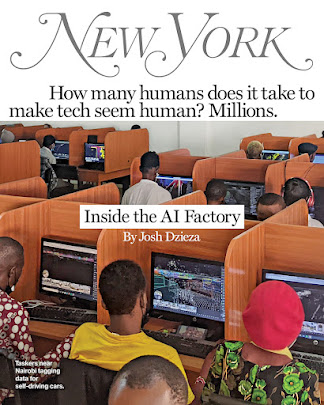
To read: Inside the AI Factory. Behind even the most impressive AI system are people. Vast numbers of low-paid people label data to train it and clarify data when it gets confused. As the technology becomes ubiquitous, a large tasker underclass is emerging:
----
Other Resources (not required, but useful)
To bookmark and use:Approaches & Guides to Prompt Engineering in LLM like ChatGPT
The "5S Model" is another a little more advanced model of Prompt Engineering for educators (Set the Scene, Be Specific, Simplify your language, Structure the output, Share feedback)
To browse: Resources from aiedu.orgThe AI Education Project. We used some resources from there while working on Digital Citizenship activities.
To listen: Pondering AI podcast: How is using artificial intelligence (AI) shaping our human experience? Kimberly Nevala talks with diverse innovators, advocates, and data scientists.
To browse: Secondary Idea for English 12: An Exploration of British Classic and Contemporary Science Fiction Literature Focusing on Artificial Intelligence:
To read: Everything You Ever Wanted To Know About Computer Vision.
Train a computer to recognize your own images, sounds, & poses with a Google Teachable Machine
ISTE standards for Educators' connection:
Standard 2.2 Leader: Educators seek out opportunities for leadership to support student empowerment and success and to improve teaching and learning.
2.2.c Model Digital Tool Use: Model for colleagues the identification, exploration, evaluation, curation, and adoption of new digital resources and tools for learning.
Standard 2.3 Citizen: Educators inspire students to positively contribute to and responsibly participate in the digital world.
2.3.b Evaluate Resources for Credibility - Establish a learning culture that promotes curiosity and critical examination of online resources, and fosters digital literacy and media fluency.
2.3.c Teach Safe, Legal, Ethical Practices - Mentor students in safe, legal and ethical practices with digital tools and the protection of intellectual rights and property.
Standard 2.4 Collaborator: Educators dedicate time to collaborate with both colleagues and students to improve practice, discover and share resources and ideas, and solve problems.
2.4.b Learn Alongside Students: Collaborate and co-learn with students to discover and use new digital resources, and diagnose and troubleshoot technology issues.
Standard 2.6 Facilitator: Educators facilitate learning with technology to support student achievement of the ISTE Standards for Students.
2.6.d Model and Nurture Creativity: Model and nurture creativity and creative expression to communicate ideas, knowledge or connections.
Universal Design for Learning (UDL) is an educational framework based on research in learning theory, including cognitive neuroscience. It guides the development of flexible learning environments that accommodate individual learning differences.
CAST (Center for Applied Special Technology) is a non-profit organization founded in 1984 to improve education for all students. CAST pioneered the development of the UDL framework, drawing on scientific insights into how humans learn. One of their key ideas is that there is no "average" brain — we are all different.
CAST’s mission is to transform education by creating more equitable and inclusive learning environments. The UDL framework is built on three core principles that help educators design flexible instructional experiences:
Multiple means of engagement: Offer different ways to motivate and involve students.
Multiple means of representation: Present content in various formats to support understanding.
Multiple means of action and expression: Allow students to show what they know in different ways.
By applying these principles, educators can create learning experiences that offer options and support for all learners.
Design Thinking is a broad, human-centered approach to problem-solving that emphasizes empathy, creativity, and iteration. It’s used across industries (tech, healthcare, business), not just in education, to design solutions that truly meet people’s needs.
While UDL (Universal Design for Learning) focuses on flexible learning environments, Design Thinking is broader. It supports inclusive design by centering the voices of diverse users and encouraging collaboration, experimentation, and equity-driven innovation.
Inclusive Design
"Inclusive design isn't about disability. It's about creating a design process that is in service of all users.".
Inclusive Design is a specific application of Design Thinking that ensures solutions work for people with diverse needs, abilities, and backgrounds.
This video showcases how the Xbox team at Microsoft uses inclusive design to support Deaf and Hard of Hearing gamers by creating features that reflect diverse needs and preferences. It emphasizes that inclusive design is about serving all users, not just those with disabilities, through empathy-driven innovation and collaboration:
Browse the resources on https://webaim.org WebAIM (Web Accessibility In Mind), a non-profit service center at Utah State University dedicated to improving web accessibility.
This set of Readings, Watchings, Listenings, and Doings (RWLDs) is designed to prepare you for the lecture on "Systematic Instructional Design and Nurturing Thinking Skills." It will support you as you plan your Thematic Unit and give you useful benchmarks for designing activities that help children grow into curious thinkers, creative problem-solvers, and not just memorizers of facts.
This post will focus on 5 terms:
Systematic Instructional Design (SID)
Backward Design
Observable Verbs
Bloom's Taxonomy
Depths of Knowledge (DoK)
What is Systematic Instructional Design (SID)?
It is a methodical (systematic) approach to planning and creating (designing) educational experiences that guide learners toward specific goals. By following a structured process, SID ensures that every element of the lesson (instruction) is organized, clear, and tailored to meet the unique needs of your students. This approach also supports continuous improvement, as ongoing evaluation and feedback help refine and enhance the learning experience.
Designing Your Instruction ...backward
Generated with AI
It's just common sense to begin with the end in mind when you are designing instruction. Begin by defining what you want your students to learn and plan your instruction to that result. This is called Backward Design.If you don't know where you are going, how will you know when you get there?
Let’s compare Systematic Instructional Design (SID) to planning a road trip:
1. Decide the Destination (Backward Design)
Just like with a road trip, you start by deciding where you want to go. This is the end goal—where you want your learners to end up. In SID, this means defining clear learning objectives.
Backward Design: You think about the destination first, and then plan everything else around it. In teaching, this means figuring out what you want students to know or do by the end, and then working backward to plan the journey.
2. Understand Your Travelers (Learner analysis)
You need to know who’s coming on the trip—how much they already know, their interests, and how they like to travel. This is like understanding your learners, their background knowledge, unique needs, and learning styles.
3. Map Out the Route (Content Sequencing and Structuring)
Now, plan the best way to get to your destination. Do you want to take the scenic route or the fastest highway? In SID, this is organizing your content and activities in a logical sequence and scaffolding them from simple to complex.
4. Pack the Essentials (Instructional Strategies)
Make sure you have everything you need—maps, snacks, gas money. In SID, this is about choosing the right teaching methods, tools, and materials to support learning.
Strategies may include direct instruction, collaborative learning, problem-based learning, and use of multimedia
5. Plan Checkpoints. (Assessment and Evaluation)
Along the way, you’ll check your progress—are you still on track? This is like using formative assessments to see if learners are understanding the material as you go.
Use formative assessments to provide ongoing feedback and summative assessments to evaluate overall learning outcomes
6. Enjoy the Journey (Implementation)
Now you’re on the road, following your plan. This is the actual teaching part, where you deliver the lessons. You’re confident in your journey because you planned it backward from the destination. The trip is designed to ensure you reach your final goal.
7. Reflect on the Trip (Evaluation)
When you reach your destination, reflect on how the trip went. Did everything go as planned? This is like evaluating whether your teaching was effective—did the learners achieve the goals?
8. Improve for the Next Time
Learn from the trip to make your next one even better. In SID, use feedback and results to refine your teaching methods.
Use the data from evaluations to make ongoing improvements to the instructional design process.
Ensure that the instruction remains relevant and effective as learner needs and technology evolve.
Makes a lot of sense, doesn't it?
Measure Success through Observable Verbs
Observable verbs are action words used to describe specific behaviors or actions that can be seen or measured (assessed!).
Bookmark: link to observable verbs, also discussed in the lecture: https://www.teachthought.com/critical-thinking-posts/blooms-taxonomy-verbs/ You may use it as a reference in a thematic unit assignment
Observable verbs help ensure that learning goals are specific, measurable, and focused on tangible outcomes. Example,
If you want to check if your students understand the water cycle, you would use observable verbs to create assessments that clearly show whether they grasp the concept. Instead of asking if they "understand" the water cycle, you would ask them to perform specific tasks that demonstrate their understanding:
Identify(or label) the different stages of the water cycle in a diagram
Describe what happens during the evaporation stage
Create a simple model of the water cycle using household items and demonstrate how water moves through the cycle
If you want to check if your students have learned the multiplication table, you would use observable verbs to create assessments that reveal their proficiency.
Fill in the missing numbers in this multiplication table for 1 through 12
Solve the following problems: 6 × 9, 4 × 7, and 8 × 5
If you buy 3 packs of pencils and each pack contains 12 pencils, calculate how many pencils you have in total.
Using observable verbs helps ensure that learning objectives and assessments are clear and focused on what students can do, making it easier to observe and measure their progress and success.
But what kind of thinking are we asking students to demonstrate?
How can we help our children grow into curious thinkers, creative problem-solvers, and not just memorizers of facts? Thinking can be simple—like remembering a fact—or more complex, like solving a problem or creating something new. As educators, we help students grow across this full range.
Lower-Order Thinking (LOTS) includes recalling facts and basic understanding.
Higher-Order Thinking (HOTS) involves applying knowledge, analyzing ideas, evaluating outcomes, and creating new solutions.
To support this growth, we use tools like Bloom’s Taxonomy. Think of it as building blocks for the mind:
It starts with remembering and understanding.
Then moves to applying and analyzing.
And finally reaches evaluating and creating.
Bloom’s helps us design lessons that challenge students to think more deeply. It also guides us in writing clear learning goals using action words that show what students will do.
To watch: In this video, you can see a quick recap about Bloom's Taxonomy and also how it applies in a digital world
Depths of Knowledge (DoK)
We also consider Depth of Knowledge (DoK) to assess how deeply students understand and apply their learning. DoK helps us design meaningful assessments that go beyond surface-level recall.
While Bloom's Taxonomy is commonly used to categorize and evaluate the thinking processesstudents use to understand and apply knowledge, it isn't specifically designed to assess the complexity of students' knowledge or the assessments teachers use.
In contrast, Depth of Knowledge (DoK) is a framework created to evaluate the depth and complexityof tasks, tests, and projects. It helps educators:
Design assessments that challenge students appropriately
Measure students' understanding and skills more accurately
Align tasks with learning goals and standards
DoK involves 4 Levels:
Level 1: Recall and Reproduction - involves basic recall of facts or information.
Level 2: Basic Skills and Concepts - requires more than simple recall and includes applying skills or concepts.
Level 3: Strategic Thinking - involves reasoning, planning, and using evidence to solve problems.
Level 4: Extended Thinking - requires complex and abstract thinking, often over an extended period.
This week, you’ll practice writing objectives that challenge students at all levels of thinking. Remember: the verb is the key to clarity and success.
--
Extra Resources (not Required)
What is Bloom’s Taxonomy, and how can learning and development professionals use it in real-world training programs